Introduction
Overview
The SpeechToText SDK provides an API for converting speech to text. Third-party apps integrate with the Speech Service of Pleos Connect through the SpeechToText SDK. When a third-party app requests speech recognition, the Speech Service converts the recognized speech into text and delivers the recognition result to the app.
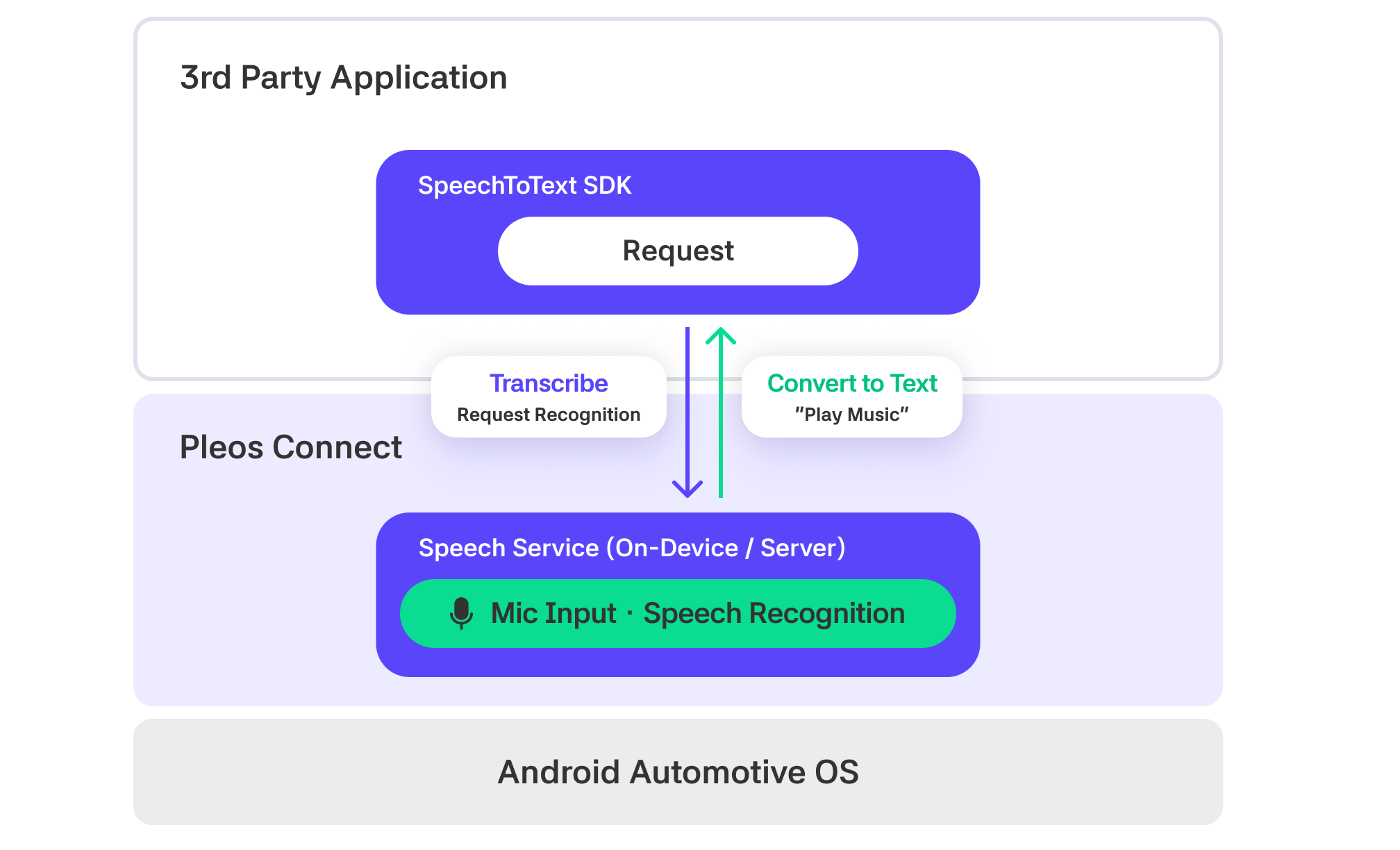
SpeechToText converts user utterances into text like "음악 틀어줘" and returns it, but does not perform actual actions like playing music. To execute app functions based on recognized commands, refer to the Gleo Interface.
Entry point
The ai.pleos.playground.stt.SpeechToText class is the entry point for accessing the SpeechToText SDK features. Create an object by passing the application Context and recognition Mode to the constructor. If Mode is omitted, HYBRID is applied.
SERVER: Uses only server-based streaming TextToSpeech. Requires network connection and app registration, and if the network connection fails, it does not switch to the On-device engine but delivers an error event. To use server-based synthesis, app registration with Pleos Playground's My Project credentials is required.ON_DEVICE: Executes Streaming TextToSpeech on the vehicle's On-device engine. Does not require a network connection, and since server-based synthesis is not used, app registration is not necessary.HYBRID: The default mode. Prioritizes server-based streaming TextToSpeech, and if the network connection fails, the SDK automatically switches to the On-device engine. App registration with Pleos Playground's My Project credentials is required.
- Kotlin
- Java
import ai.pleos.playground.stt.SpeechToText
import ai.pleos.playground.stt.constant.Mode

val speechToText = SpeechToText(applicationContext, Mode.HYBRID)
import ai.pleos.playground.stt.SpeechToText;
import ai.pleos.playground.stt.constant.Mode;

SpeechToText speechToText =
        new SpeechToText(getApplicationContext(), Mode.HYBRID);
In the next steps, complete Importing the SpeechToText SDK and Declaring Permissions before initializing the SDK.
Emulator setup
To use the SpeechToText SDK, install the Pleos Connect Emulator in Android Studio and set up the AVD.