Manage My Vehicle API Key
API Key Status
To check the current API key status, check the manufacturer-specific My Vehicle Data API screen and its API key status.
Private Users' Vehicle Data API key has the following lifecycle states depending on the issuance stage. Click the ⓘ icon next to API key status to view the legend.
| Status | Description |
|---|---|
| Not Generated | The API key has not been issued yet |
| Generated | The API key has been issued and can be used |
| Revoked | The API key has been revoked and can no longer be used |
| Expired | The validity period has expired and the API key can no longer be used |
Revoke API Key
To revoke an API key, click Revoke API Key on the My Vehicle Data API screen. The Revoke API Key button is enabled only when an API key has already been issued.
When you revoke an API key, access tokens issued with that API key can no longer be used.
-
Click Revoke API Key on the My Vehicle Data API screen.
-
When the Revoke Personal API Key? pop-up appears, click Revoke.
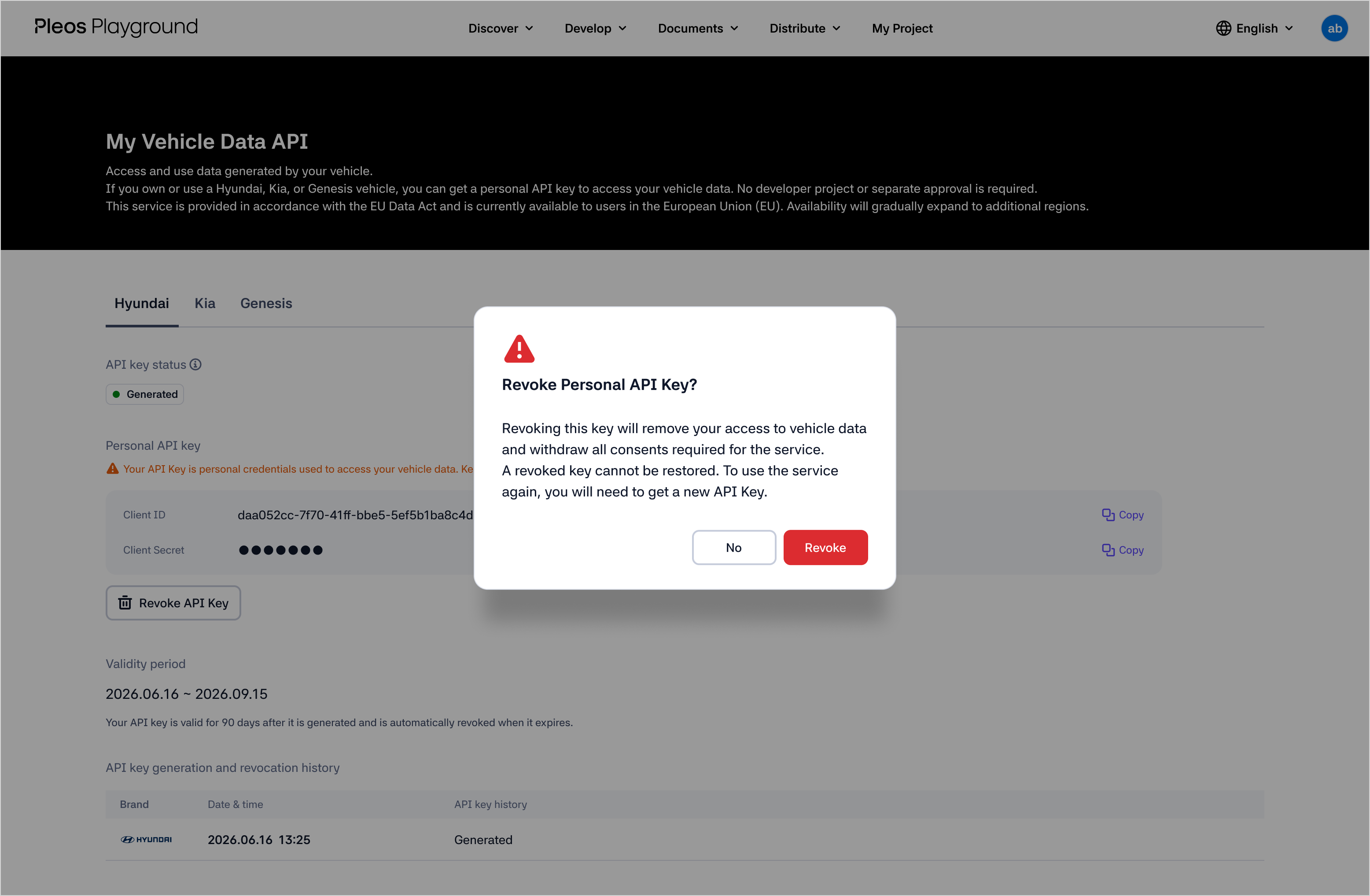
- You can check the API key issuance and revocation history in the list at the bottom of the My Vehicle Data API screen.
tip
- When the validity period of an API key expires, access tokens issued with that API key are invalidated.
- When you reissue an API key, access tokens issued with the previous API key are invalidated. Sign in again and issue a new access token with Create Access Token.