Pleos Connect Virtual Console User Guide
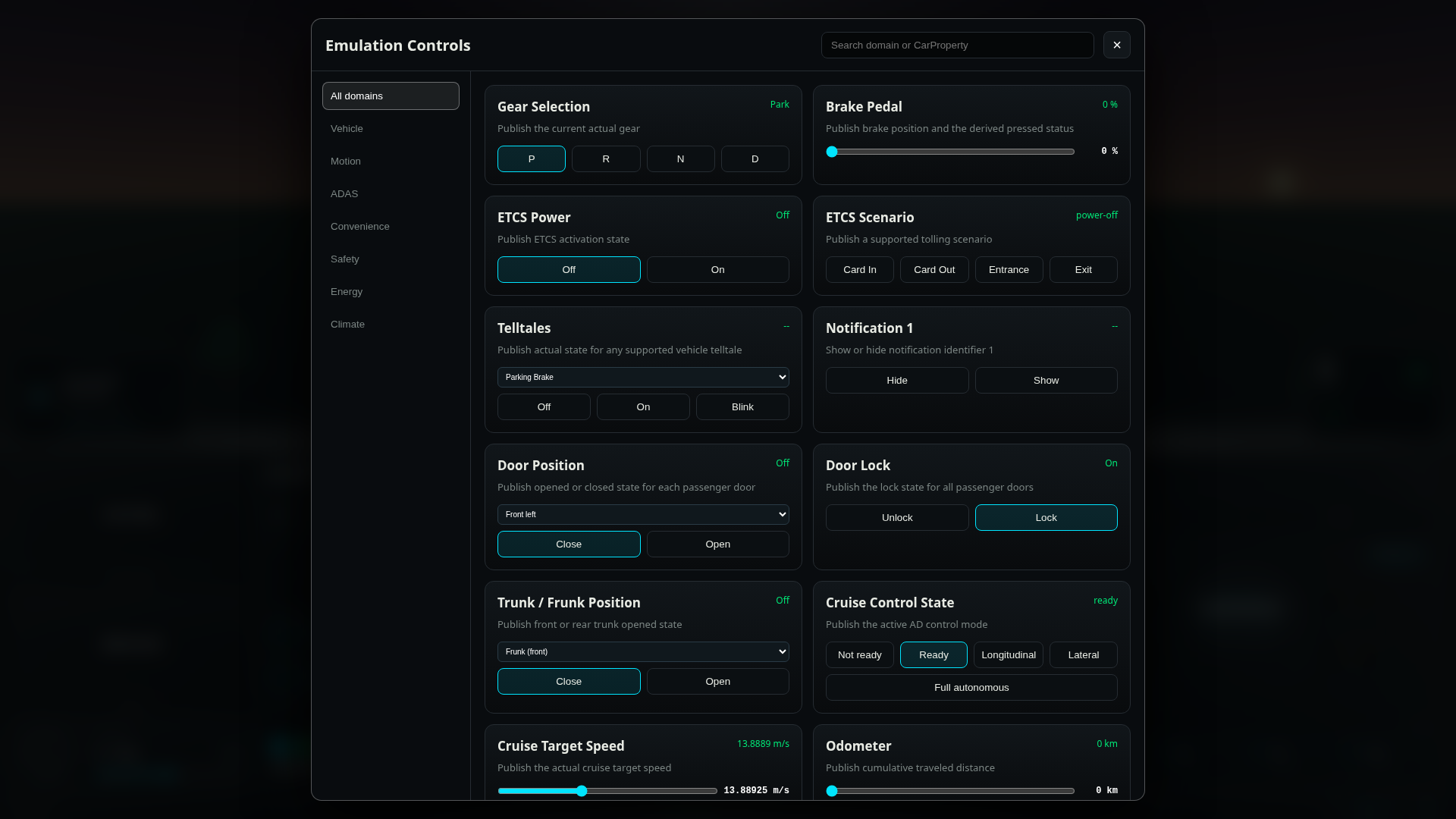
With Emulation Controls in Pleos Connect Virtual Console, you can configure vehicle states and events by domain to verify how the app behaves when vehicle states change.
Before you start
Start Pleos Connect Emulator and connect to Virtual Console by following the Pleos Connect Virtual Console setup guide.
Using Emulation Controls
- Open Emulation Controls in Pleos Connect Virtual Console.
- Select the domain to test from the list on the left, or search for a card name in the search box.
- If a card provides vehicle-area options, select the area to test.
- Change the state or value using a button, list, or slider.
- Check the result in Pleos Connect Emulator and in the app under test.
Vehicle
| Card | Function |
|---|---|
| Notification 1 | Shows or hides the vehicle notification with identifier 1. You can check how the app displays each notification state. |
Motion
| Card | Function |
|---|---|
| Gear Selection | Sets the current gear to P, R, N, or D. |
| Brake Pedal | Sets the brake pedal position from 0 to 100% and reproduces the pedal state derived from that value. |
| Odometer | Sets the accumulated distance from 0 to 1,000,000 km in 1 km increments. |
| Steering Angle | Sets the steering wheel angle from -540 to 540 degrees in 1-degree increments. |
| Steering Wheel Heat | Sets the steering wheel heating level to Off, Low, Medium, or High. |
ADAS
| Card | Function |
|---|---|
| Cruise Control State | Sets the cruise control state to Not ready, Ready, Longitudinal, Lateral, or Full autonomous. |
| Cruise Target Speed | Sets the cruise control target speed from 5.556 to 27.778 m/s in 0.277775 m/s increments. |
Convenience
| Card | Function |
|---|---|
| ETCS Power | Sets the electronic toll collection system to Off or On. |
| ETCS Scenario | Triggers card insertion/removal or toll-gate entry/exit scenarios. |
| Door Position | Selects the left or right front or rear door and sets it to open or closed. |
| Door Lock | Sets the lock state of all passenger doors to Unlock or Lock. |
| Trunk / Frunk Position | Selects the frunk or trunk and sets it to open or closed. |
| Cabin Lights Switch | Sets the cabin lights for all seats to Off or On. |
| Reading Lights | Selects the left or right front or rear seat and sets its reading light to Off or On. |
| Ambient Brightness | Sets the ambient light brightness from 0 to 100% in 1% increments. |
| Ambient Color | Sets the ambient light color to Cyan, Blue, Purple, or White. |
| Exterior Lights Mode | Sets the exterior light mode to Off, Auto, Tail lamp, or Low beam. The tail and low-beam lights change together according to the selected mode. |
| High Beam | Sets the actual high-beam state to Off or On. |
| Hazard Lights | Sets the hazard-light switch and actual state to Off or On. |
| Stop Lights | Sets the actual brake-light state to Off or On. |
| Door Lights | Selects the frunk or trunk and sets its door-light state to Off or On. |
| Turn Signal State | Sets the turn signal to Off, left or right Blink, or left or right Flash. |
| Window Position | Selects a left or right front or rear window and sets its position from 0 to 100% in 1% increments. |
| Window Lock | Selects both rear windows or a left or right window and sets the lock state to Unlock or Lock. |
| Seat Occupancy | Selects the driver's seat, passenger seat, or left or right rear seat and sets occupancy to Empty or Occupied. |
| Windshield Wiper Switch | Selects the front or rear windshield and sets the wiper mode to Off, Auto, Low, or High. |
| Glove Box | Sets the passenger-side glove box to open or closed. |
Safety
| Card | Function |
|---|---|
| Telltales | Selects supported warning lights, such as the parking brake, seat belt, ABS, and TPMS, and sets them to Off, On, or Blink. |
Energy
| Card | Function |
|---|---|
| Remaining Range | Sets the estimated remaining range from 0 to 1,000,000 m in 1,000 m increments. |
| Battery Energy | Sets the current traction-battery energy from 0 to 200 kWh in 0.1 kWh increments. |
| Battery SOC | Sets the traction-battery state of charge from 0 to 100% in 1% increments. |
| Battery Capacity | Sets the maximum traction-battery capacity from 0 to 200 kWh in 0.1 kWh increments. |
| Charge Current Limit | Sets the charging-current limit from 10 to 48 A in 0.5 A increments. |
| Charge Percent Limit | Sets the target charge level from 50 to 100% in 5% increments. |
| Charge Switch | Sets charging to Off or On. |
| Charge Port | Sets the charge-port state to Closed or Open. |
Climate
| Card | Function |
|---|---|
| HVAC Power | Sets the climate-control power to Off or On. |
| Air Conditioning | Sets air conditioning to Off or On. |
| HVAC Auto | Sets automatic climate control to Off or On. |
| HVAC Dual | Sets driver/passenger climate synchronization to Off or On. |
| Air Recirculation | Sets the air intake state to Fresh or Recirculate. |
| Fan Speed | Sets the climate fan speed from 0 to 8. |
| Fan Direction | Selects the driver or passenger side and sets the air direction to Face, Floor, or Defrost. |
| Defroster | Selects the front or rear defroster and sets it to Off or On. |
| Target Temperature | Selects the driver or passenger side and sets the target temperature from 16 to 30°C in 0.5°C increments. |
| Seat Temperature | Selects the driver or passenger side and sets seat ventilation to one of three levels or Off, or seat heating to one of three levels. |
| Air Cleaner | Sets the air cleaner to Off or On. |