Introduction
SpeechToText SDK Overview
The SpeechToText SDK provides an API for converting speech to text. Third-party apps integrate with the Speech Service of Pleos Connect through the SpeechToText SDK. When a third-party app requests speech recognition, the Speech Service converts the recognized speech to text and returns the recognition result to the app.
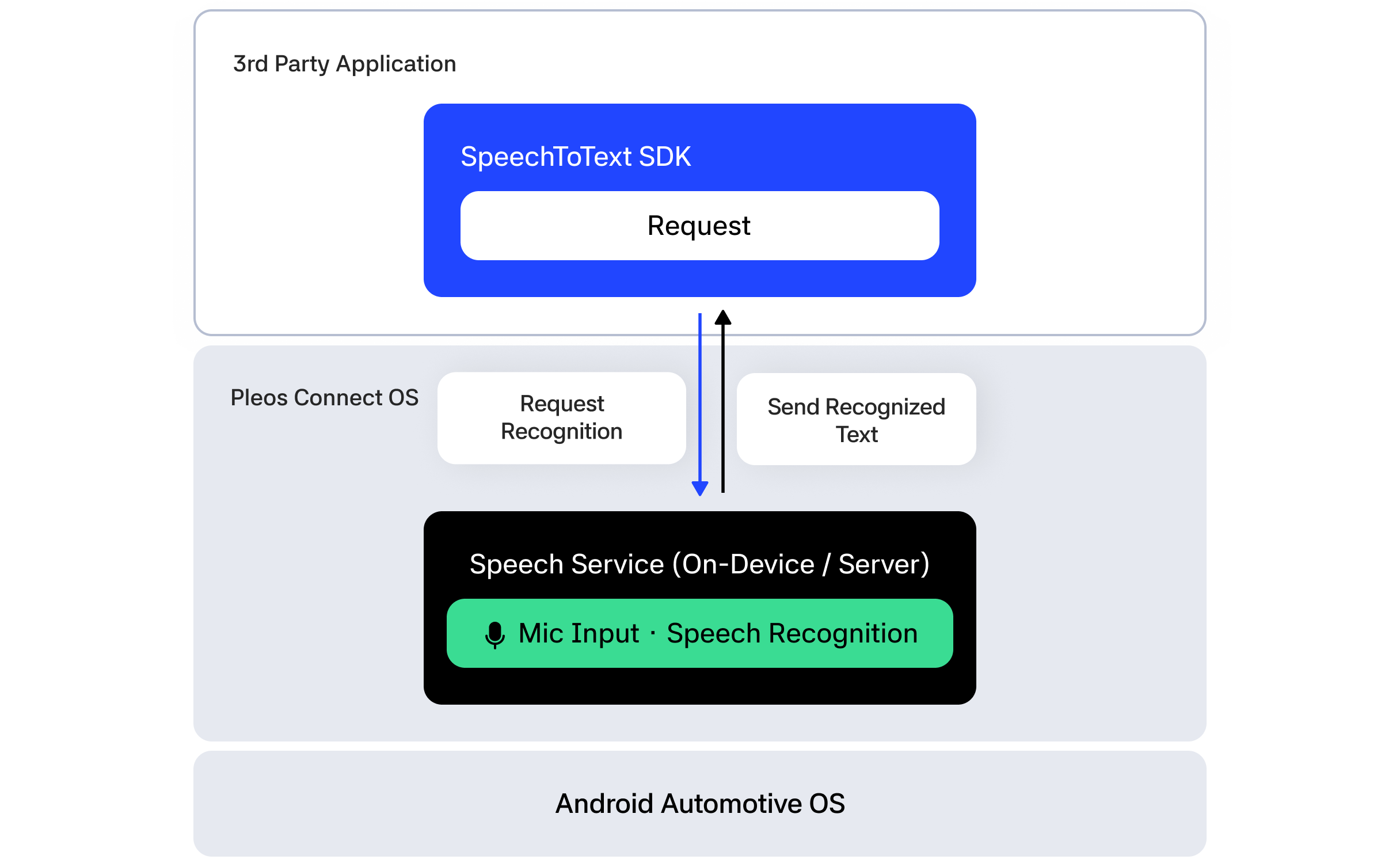
SpeechToText converts a user utterance into text, such as "Play some music", and returns that text. It does not execute real actions, such as starting music playback. To execute app features based on recognized commands, see Gleo Interface.
This guide is based on SpeechToText SDK v3.3.1.
Speech recognition modes
The SpeechToText SDK provides the following three speech recognition modes.
HYBRID: The default mode. It prioritizes server-based streaming speech recognition and automatically switches to the On-device engine if the network connection fails. App registration with My Project credentials from Pleos Playground is required.SERVER: Uses server-based speech recognition. It requires a network connection and app registration. If the network connection fails, it does not switch to the On-device engine.ON_DEVICE: Runs speech recognition on the vehicle's On-device engine. It does not require a network connection, and app registration is not required when using this mode only.
Entry point
The ai.pleos.playground.stt.SpeechToText class is the entry point for accessing SpeechToText SDK functionality. Create an instance by passing the application Context and recognition Mode to the constructor. If you omit Mode, the SDK uses HYBRID.
A typical usage sequence is as follows.
- Create a
SpeechToTextinstance. - Initialize the SDK with
initialize(). - Register a
ResultListenerwithaddListener(). - If needed, set the recognition language/region with
setLocale(). - If using server-based recognition modes (
HYBRID,SERVER), complete app registration. - Start speech recognition with
request(). - When recognition is done, call
stop(). - After use, remove listeners with
removeListener()and release resources withrelease().
Example: Create SpeechToText instance
- Kotlin
- Java
import ai.pleos.playground.stt.SpeechToText
import ai.pleos.playground.stt.constant.Mode

val speechToText = SpeechToText(applicationContext, Mode.HYBRID)
import ai.pleos.playground.stt.SpeechToText;
import ai.pleos.playground.stt.constant.Mode;

SpeechToText speechToText =
        new SpeechToText(getApplicationContext(), Mode.HYBRID);
Emulator setup
To use the SpeechToText SDK, install the Pleos Connect Emulator in Android Studio and configure an AVD.
- Check software development environment requirements
- Install the Pleos Connect Emulator
- Create and run an AVD
- Set up Pleos Connect Virtual Console
- Configure microphone access
- Configure cold boot